
Compass Challenges
The accelerometercompass measuresdetects the accelerationEarth's ofmagnetic yourfield, making it possible to determine the direction in which the micro:bit.bit is oriented. (It activatesneeds whento yourbe boardcalibrated movesto andensure an accurate result.)
Calibrate the compass
The first time we record a program, this message appears on the screen:
Tilt to Fill Screen
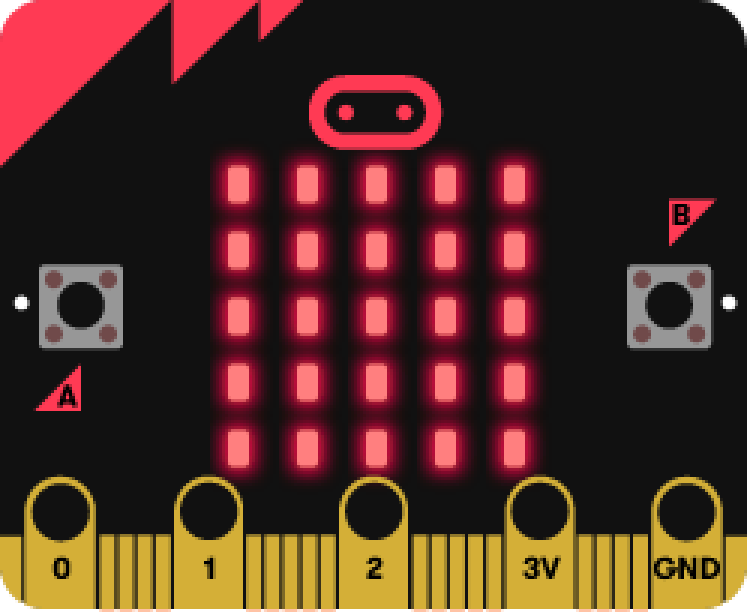
Once the aforementioned text appears, a dot will emerge; it will gradually fill the screen as you tilt the device.
Objective: to fill the entire screen with LEDs.
Better with a video
Numerical compass
The magnetic field sensor integrated into the micro:bit can also detectbe used to measure the Earth's magnetic field. This makes it possible to determine the direction of magnetic north and, in turn, program a compass.
True to the spirit of the micro:bit, only a few lines of code are needed to create a digital compass. The code shown below displays the direction the logo is pointing toward whenever button A is pressed.
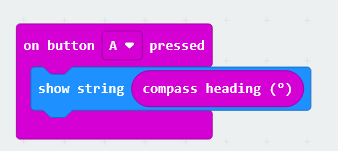
Like the other actions,sensor blocks, the compass heading (º) block can be found in the Input menu.
The heading is displayed in degrees. It is worth noting that a value of 0º corresponds to north, and 180º to south. The following compass rose may help clarify the relationship between the cardinal directions and their corresponding headings:
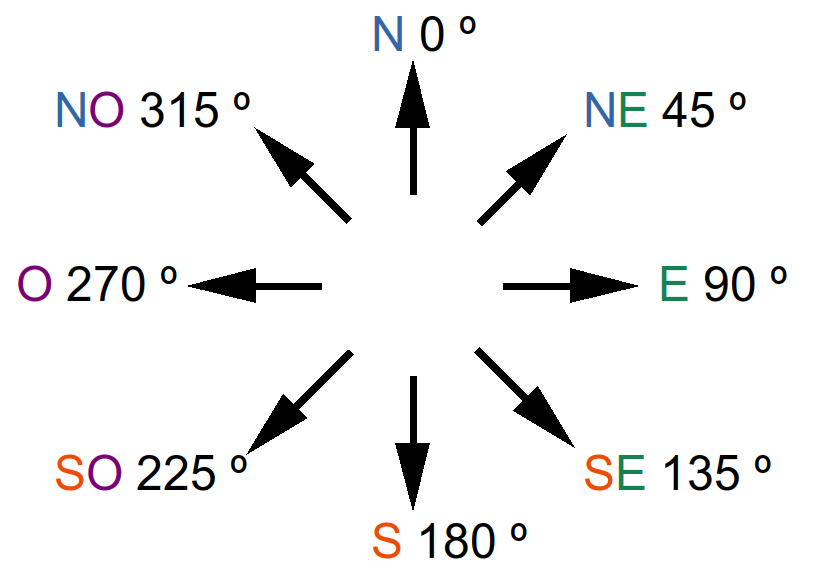
For example, according to the compass rose, a reading of 340º indicates that the micro:bit logo is pointing in a nearly northerly direction—specifically, north-northwest.
The compass works best outdoors, as the magnetic sensor’s readings can be affected by the presence of metal objects inside buildings, such as shaking,household rotating,appliances or the steel reinforcement in columns and evenfloor lettingstructures.
When you turn on the micro:bitbit, falla message in freefall!
Axesmay ofappear, asking you to shake the accelerometer

Byto Ugopediacalibrate [CCthe BY-SAsensor. 4.0This ],was fromcovered Wikimediain Commonsthe previous section.
Challenge #1: ElectronicDetermine diethe orientation
AMagnetic dienorth is athe cubicdirection objectindicated usedby inthe gamesmagnetized needle of chance.a Itscompass—a faces feature dotsdirection that representdoes differentnot numbers.
The proposal is to create an electronic diewith that usesof the LEDgeographic panelNorth toPole. displayOne can determine orientation if the resultdegrees of randomlydeviation generatingfrom amagnetic numbernorth betweenare 1 and 6.known.
Objective.
Code description.
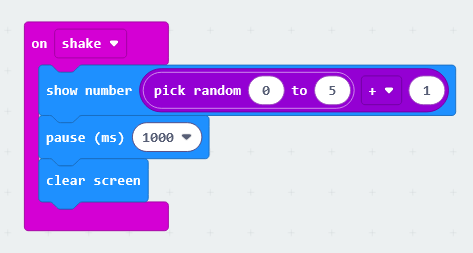
The program begins with an "on shake" block, which displays a randomly selected number between 0 and 5, with 1 added to it. We add 1 because the block’s random selection process starts from a base value of 0.
After a 1-second pause, the screen is cleared, and the system waits for the micro:bit to be shaken again.
Extra activity.
Design a program that allows for playing roulette; it must also indicate whether the result is red or black, or if the house wins.
Challenge #2: Heads or tails
The game of "heads or tails" is a game of chance that uses a coin. The winner is the person who correctly guesses which side of the coin (out of the two possibilities) will land facing up. Each of the two sides has a distinct name, and these serve as the options from which the participants can choose. Consequently, the participants—whether two individuals or two teams—each have a 50% chance of guessing correctly.
This game is frequently used as a way to make decisions or to determine an outcome by chance—often among friends or in informal settings—but it is also fully accepted in certain formal contexts, such as at the start of a professional soccer match.
Objective.
The micro:bit should be placed with the LED panel facing down. When it is turned face up, it will show either heads or tails; the person who chose the displayed option wins.
Code description.
First, create a variable—you can name it “random.”
Use the “screen"forever" facingevent up”to block asstart the starting event. Then, assign a random value between 0 and 1 to the “random” variable.program.
Use an “if-then-else” logic block to determine the winning option. If the “random” variable equals zero, assign the “happy face” icon; otherwise, the “cross” icon wins. Display the winningvalue option usingfrom the “showcompass icon”heading block.sensor (º), which provides the angle of deviation from Magnetic North.
AfterWait a1 one-second pause,and clear the screen.
To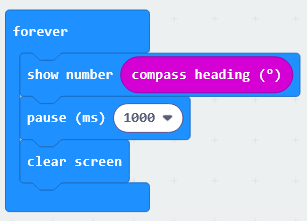
Analog compass
We will complete the process,compass placefunctionality by adding a cursor that continuously indicates the direction of north. We will use a timer event to read the sensor and update the cursor display every half second.
Within the timer event, the code will draw an upward-pointing arrow when the micro:bit’s orientation is greater than 315° or less than 45°—that is, when the logo is pointing approximately toward north. The conditional blocks and comparison operators used in the code can be found in the Logic menu.
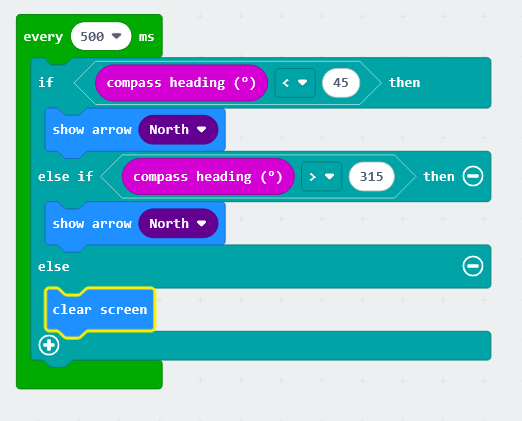
However, this program will only display the arrow when the logo points north; otherwise, it will clear the screen. To ensure an arrow remains on the screen pointing north at all times, you must click the + sign to add lines to the conditional block.
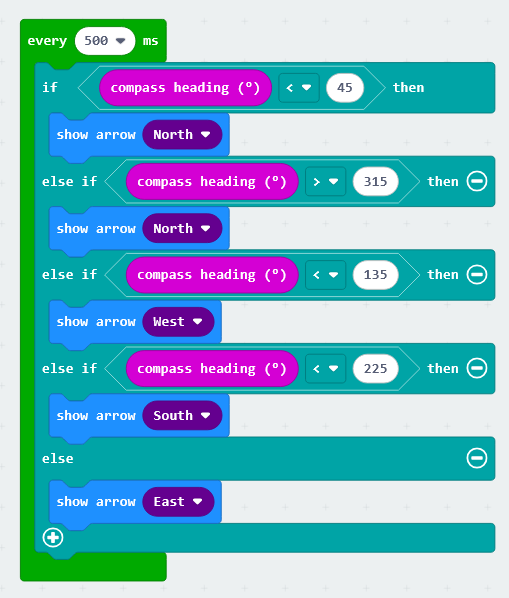
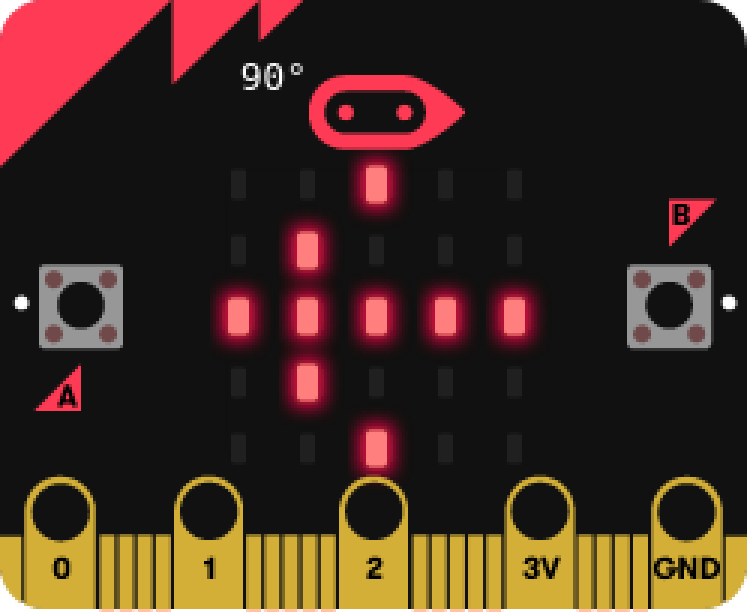
Note that when the micro:bit withlogo points east—that is, when the displaycompass facingheading down;(º) is less than 135—the arrow must be drawn pointing to the left (west-pointing arrow); conversely, when youthe turnlogo itpoints backwest, overan (displayarrow facingpointing up),to the programmedright code(east-pointing arrow) must be displayed. Only in this way will runthe again.arrow always point toward the north.
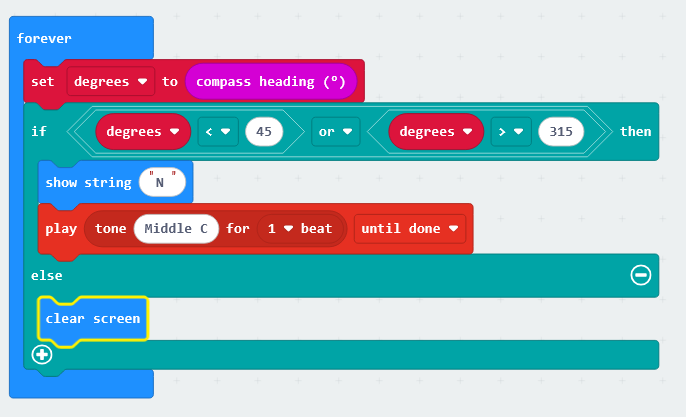
Challenge #2: Audible orientation signal for North.
ToWhen seeyou howneed to orient yourself using a map, the programfirst works,step is to align the map so that it isfaces recommendednorth. toTo loaddo thethis, codeyou ontoshould use a micro:bit. In the simulator, the process is not as intuitive.compass.
Extra activity.Objective.
Create a program that allowsuses youan audible alert to playindicate “Evens or Odds” againstwhen the micro:bit.bit is oriented toward the North.
Code description.
Use the "forever" event to start the program.
Create a variable to store the sensor value obtained from the compass heading block (°).
Use an "if-then-else" conditional statement to check which range the sensor value falls into.
If the value is between 315° and 45°, the micro:bit is oriented toward the North; in this case, an "N" will be displayed and a note will play. If this condition is not met, the screen is cleared.
.
Extracted and translated from catedu