
Temperature Sensor Challenges
The temperature sensor integrated into micro:bit detect the ambient temperature in Celsius degrees.
Challenge #1: Digital Thermometer
A thermometer is an instrument used to measure temperature. The most common type consists of a sealed glass capillary tube ending in a small reservoir containing a certain amount of mercury or alcohol. This mercury or alcohol expands when the temperature rises and contracts when it falls, and the resulting volume changes are read on a graduated scale.
Digital thermometers use transducer devices and electronic circuits to convert the small voltage variations into numerical values, ultimately displaying the temperature on a screen.
Objective.
Display on the LED panel the temperature detected by the temperature sensor integrated into the micro:BIT.
Code description.
We suggest using the ‘forever’ event, which is in the ‘Basic’ category. This block allows the code entered to be executed during all the program.

Add the "show number" block, located in the Basic category. This block displays the entered number on the LED screen, scrolling it if it has more than one digit.
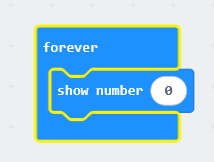
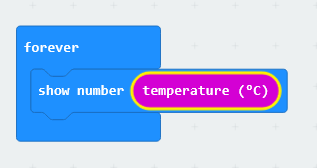
Replace the number “0” with the value obtained from the temperature sensor. This block is located in the Input category.
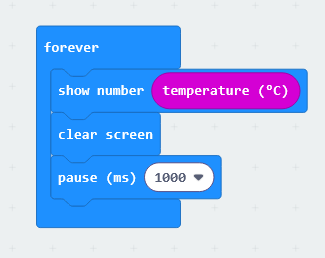
Next, the screen is cleared and a 1000 ms pause is introduced. The program then looks like this:
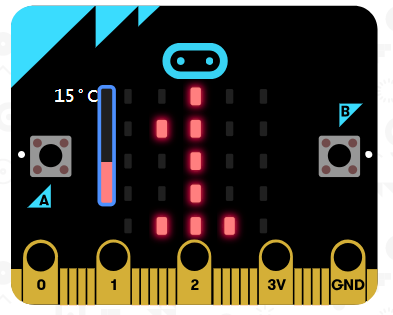
A vertical bar will appear in the simulator allowing the temperature to be adjusted; the selected temperature is the one displayed on the LED panel.
Extra exercise.
Create a program that displays the temperature in degrees Celsius when button A is pressed, and displays the temperature in degrees Fahrenheit when button B is pressed.
Challenge #2: Warning: patches of ice.
Most cars feature a snowflake-shaped warning light on the dashboard, next to the outside temperature display, to alert the driver to the potential presence of ice patches on the road. This light typically illuminates when the temperature drops below 3 degrees Celsius.
Objective.
Display a snowflake icon on the micro:bit's LED panel when the temperature is below 3 degrees.
Code description.
To start the program, it is proposed to use the "forever" event. Next, the "if... then" logical operator, found in the Logic section, must be added. This block checks whether a condition is met; if so, it executes the entered instructions.
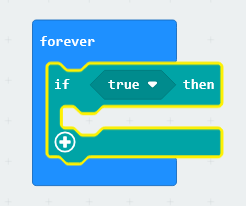
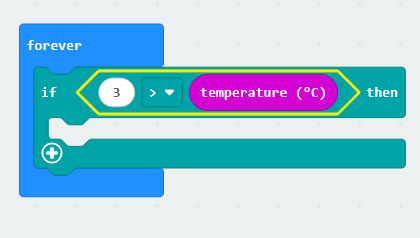
To check if the temperature is below 3 degrees Celsius, the operator that returns "true" whenever 3 is greater than the value reported by the temperature sensor will be used. The block is located in the Logic category.
To display a snowflake-shaped icon, the "show LED" block will be used; the "clear screen" block must also be added so that the LED panel does not remain lit when the temperature rises above 3°C, but with a delay to make sure that the signal is visible.
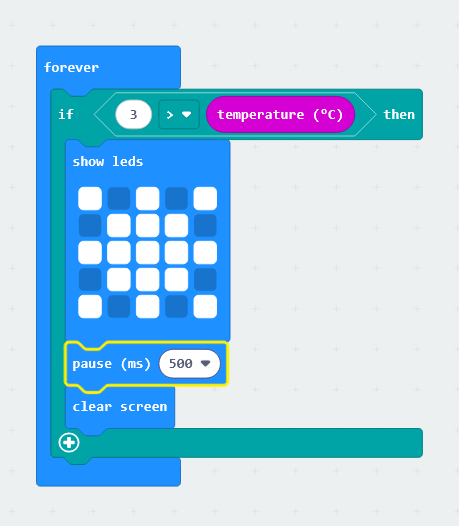
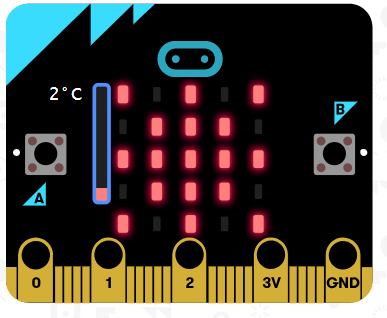
Once the code is finished, the ice symbol will appear when the temperature drops below 3°C.
Extra exercise.
Add an audible alert when the temperature drops below 3 degrees Celsius.
RetoChallenge Temperatura#3: óptimaOptimal derefrigerator una nevera
temperature
LaThe temperaturaoptimal óptimatemperature de un frigorífico es de 7ºC, mientras que la temperatura de un congelador debe estar entornofor a losrefrigerator is 7°C, while a freezer's temperature should be around -18ºC.18°C. AlgunasSome neverasrefrigerators incorporanfeature unan avisadoraudible acústicoalarm quethat seactivates activawhen cuandothe latemperature temperaturais nonot es la óptima.optimal.
Objetivo.Objective.
MostrarDisplay enthe elrefrigerator temperature on the micro:bit's LED panel LEDand deactivate laan micro:BITalarm lawhen temperaturathe deltemperature frigoríficoexceeds y activar una alarma cuando la temperatura esté por encima de 7ºC7°C.
DescripciónCode del código.description.
EnThis estechallenge retoincorporates sea incorporaspeaker unas altavozan comoexternal actuadoractuator. externo.One Seterminal conectaráwill unobe deconnected los polos alto GND yand elthe otroother alto PIN 0.
ParaTo iniciarstart elthe programaprogram, sethe usará"forever" elblock bloquewill “parabe siempre”.used. DentroInside seit, situaráthe el"if-then" condicióncondition “siwill entonces”.be Laplaced. condiciónThe acondition verificarto será:check siwill labe: temperaturaif esthe mayortemperature deis greater than 7 grados.degrees.

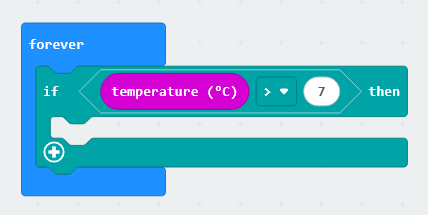
Si el valor es verdadero entonces se reproducirá un tono de aviso.
También se muestra la temperatura medida.

En el simulador se puede variar la temperatura para comprobar el correcto funcionamiento del programa.
Information extracted and translated from catedu.