
Accelerometer Challenges
The accelerometer measures the acceleration of your micro:bit. It activates when your board moves and can also detect other actions, such as shaking, rotating, and even letting your micro:bit fall in freefall!

By Ugopedia [CC BY-SA 4.0 ], from Wikimedia Commons
Challenge #1: Electronic die
A die is a cubic object used in games of chance. Its faces feature dots that represent different numbers.
The proposal is to create an electronic die that uses the LED panel to display the result of randomly generating a number between 1 and 6.
Objective.
Code description.
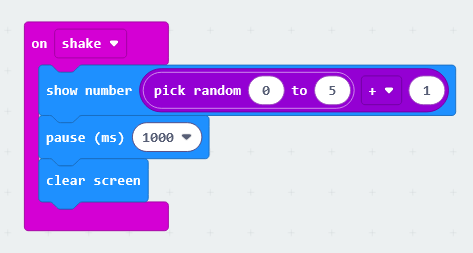
The program begins with an "on shake" block, which displays a randomly selected number between 0 and 5, with 1 added to it. We add 1 because the block’s random selection process starts from a base value of 0.
After a 1-second pause, the screen is cleared, and the system waits for the micro:bit to be shaken again.
Extra activity.
Design a program that allows for playing roulette; it must also indicate whether the result is red or black, or if the house wins.
Challenge #2: Heads or tails
The game of "heads or tails" is a game of chance that uses a coin. The winner is the person who correctly guesses which side of the coin (out of the two possibilities) will land facing up. Each of the two sides has a distinct name, and these serve as the options from which the participants can choose. Consequently, the participants—whether two individuals or two teams—each have a 50% chance of guessing correctly.
This game is frequently used as a way to make decisions or to determine an outcome by chance—often among friends or in informal settings—but it is also fully accepted in certain formal contexts, such as at the start of a professional soccer match.
Objective.
The micro:bit should be placed with the LED panel facing down. When it is turned face up, it will show either heads or tails; the person who chose the displayed option wins.
Code description.
First, create a variable—you can name it “random.”
Use the “screen facing up” block as the starting event. Then, assign a random value between 0 and 1 to the “random” variable.
Use an “if-then-else” logic block to determine the winning option. If the “random” variable equals zero, assign the “happy face” icon; otherwise, the “cross” icon wins. Display the winning option using the “show icon” block.
After a one-second pause, clear the screen.
To repeat the process, place the micro:bit with the display facing down; when you turn it back over (display facing up), the programmed code will run again.