
Accelerometer Challenges
The accelerometer measures the acceleration of your micro:bit. It activates when your board moves and can also detect other actions, such as shaking, rotating, and even letting your micro:bit fall in freefall!

By Ugopedia [CC BY-SA 4.0 ], from Wikimedia Commons
Challenge #1: Electronic die
A die is a cubic object used in games of chance. Its faces feature dots that represent different numbers.
The proposal is to create an electronic die that uses the LED panel to display the result of randomly generating a number between 1 and 6.
Objective.
Code description.
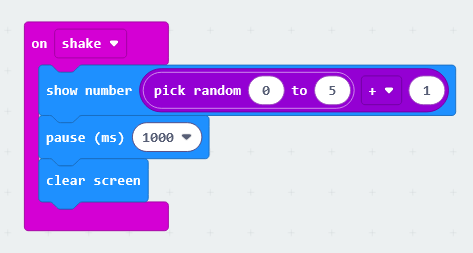
The program begins with an "on shake" block, which displays a randomly selected number between 0 and 5, with 1 added to it. We add 1 because the block’s random selection process starts from a base value of 0.
After a 1-second pause, the screen is cleared, and the system waits for the micro:bit to be shaken again.
Extra activity.